rclone使用自建私有 API 挂载od、gd网盘并且搭配aria2实现离线下载到个人网盘
onedrive
创建 OneDrive API
获取 Client ID
微软api地址为:api
应用注册,证书密码等此处省略
注意的是重定向web地址为:http://localhost:53682
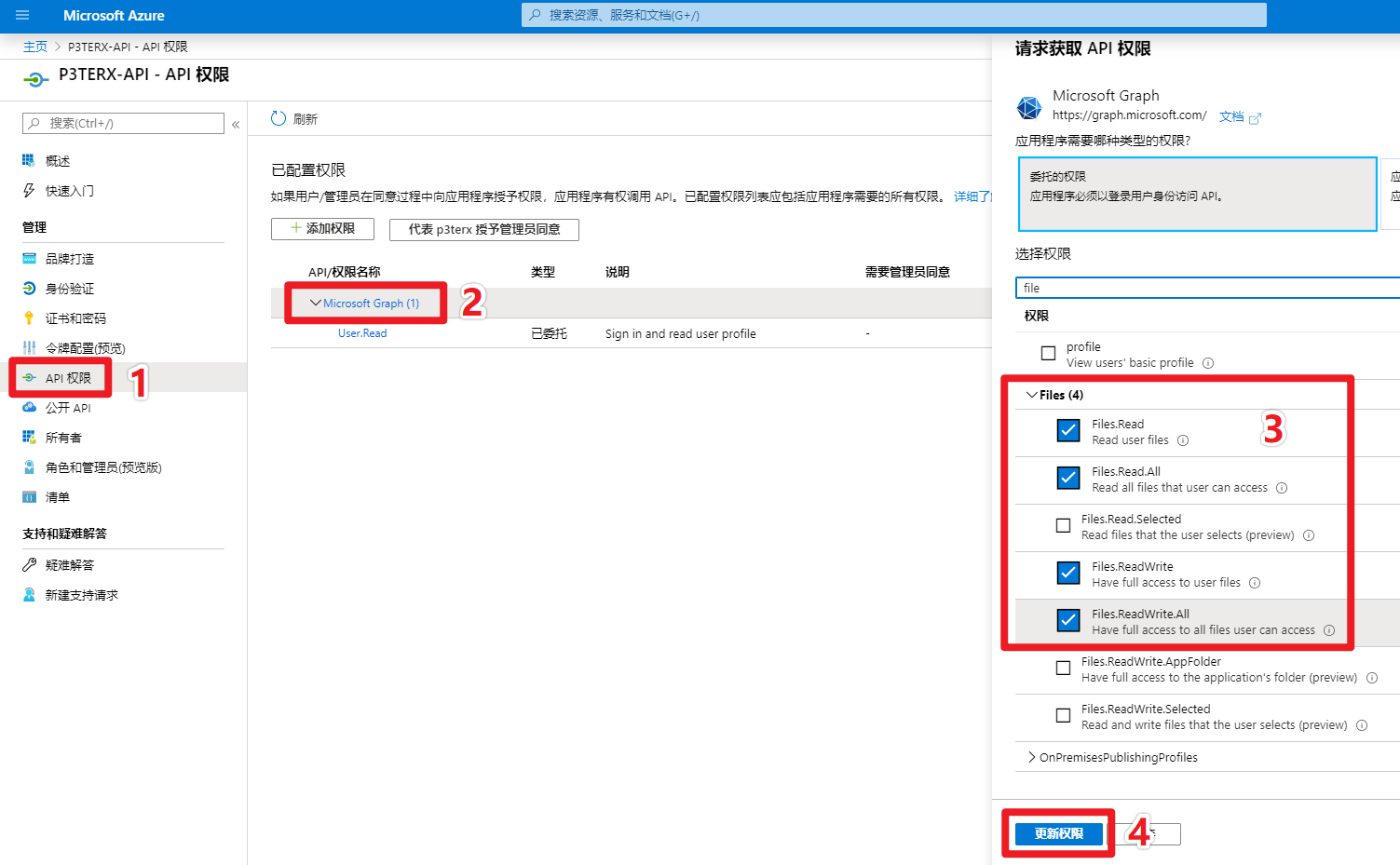
设置 API 权限
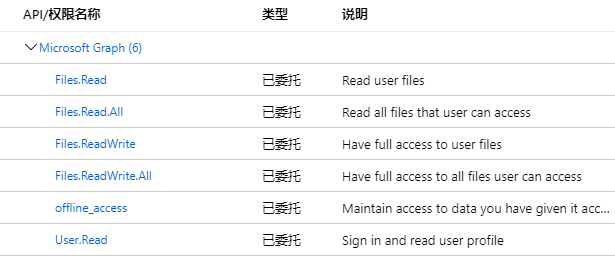
- 点击API 权限(委托),按照图示进行操作,添加Files.Read、Files.ReadWrite、Files.Read.All、Files.ReadWrite.All、offline_access、User.Read这些权限。
完整权限如下所示
获取 token
- 在本地电脑上下载rclone
- 以 Windows 为例子,解压并进入
rclone.exe所在文件夹,在资源管理器地址栏输入cmd,回车就会在当前路径打开命令提示符。 - 替换以下命令中的
Client_ID、Client_secret并执行。
rclone authorize "onedrive" "Client_ID" "Client_secret"接下来会弹出浏览器,要求你登录账号进行授权。授权完后命令提示符窗口会出现以下信息:
If your browser doesn't open
automatically go to the following
link: http://127.0.0.1:53682/auth Login and authorize rclone for access
Waiting for code...
Got code
Paste the following into your remotemachine
---> {"access_token":"xxxxxxxxxxxxxxxxxx","expiry":"2020-02-22T21:18:39.5036298+08:00"}
<---End paste
{"access_token":"xxxxxxxxxxxxxxxxxx","expiry":"2020-02-22T21:18:39.5036298+08:00"} 整个内容(包含括号)就是 token ,复制并保存好。注意 :有时因为空格太多需要先把复制的放进word里删除所有的空格在重新复制!
Rclone 连接 OneDrive
输入rclone config命令添加网盘,前面省略到输入完api密码然后
Edit advanced config? (y/n)
y) Yes
n) No
y/n> n #输入 n
Remote config Make sure your Redirect URL is set to "http://localhost:53682/" in your custom config.
Use auto config? *
Say Y if not sure *
Say N if you are working on a remote or headless machine
y) Yes
n) No
y/n> n # 输入 n
For this to work, you will need rclone
available on a machine that has a web
browser available. Execute the following
on your machine (same rclone version
recommended) : rclone authorize
"onedrive" "client_id" "client_secret" Then
paste the result below: result>
{"access_token":"XXXXXXXXX","expiry":"2020-02-22T21:18:39.5036298+08:00"} # 输入 token Choose a number from below, or type in an existing value
1 / OneDrive Personal or Business
   \ "onedrive"
2 / Root Sharepoint site
   \ "sharepoint"
3 / Type in driveID
   \ "driveid"
4 / Type in SiteID
   \ "siteid"
5 / Search a Sharepoint site
   \ "search"
Your choice> 1 #  # 这里问你要选择的类型,因为是使用 OneDrive ,所以输入 1
Found 1 drives, please select the one you
want to use: 0: OneDrive (business) id=xxxxxxxxxxxxxx
Chose drive to use:> 0
#检测到了网盘,这里编号是 0 ,所以输入 0
Found drive 'root' of type 'business', URL:https://p3terx-my.sharepoint.com/personal/xxxxxx/Documents
Is that okay?
y) Yes
n) No
y/n> y # 问你是否确认,如果没问题则输入 y然后输入rclone config查看已挂载,最后验证一下是否能正常使用,使用rclone lsd 网盘名:看是否有内容!
至此,Rclone 已成功使用自建 API 连接到了 OneDrive 网盘。
api限制
- 如果不使用rclone的话,refresh token会在90天内过期,这时需要使用
rclone config reconnect 网盘名:命令重新获取token。
GoogleDrive
获取 client_id与client_secret
与 OneDrive 不同的是,Google Drive 不需要本地 Windows 客户端预先进行授权获取 token,而是在配置过程中进行授权。无需私有api即可满速。当然私有api更好!而onedrive限速。
步骤为:
如首次来到google开发者中心,进入此链接api需要先创建一个“项目”,然后创建“OAuth 同意屏幕”,才能执行其他操作!具体操作见视频:gd
注意 onemanager添加googledrive时创建 OAuth 客户端 ID的应用类型选择web应用并在下面重定向url位置填入urlrclone
安装rclone
curl https://rclone.org/install.sh | bash配置rclone
然后输入rclone config一步步设置,也可以直接用之前已经挂载好rclone的配置文件rclone.conf放入/root/.config/rclone
目录一定是/root/.config/rclone(前面的root不能省略)
刚安装rclone后是没有rclone文件夹的,需要先rclone config才有!然后通过cd到该文件夹然后wget一个事先放到图床的文件。
然后在ssh上输入rclone config show即可查看到配置文件。
rclone常用命令
- 基础命令:
rclone move source:path dest:path source和dest都可以即是本地又是网盘
本地用/表示,网盘用:表示。
rclone move /root/download onedrive:/upload --transfers 32 -P 其中transfers表示线程,-P表示进度条。
- 一些常用
rclone copy - 复制
rclone move - 移动
rclone sync - 同步:将源目录同步到目标目录,只更改目标目录。
rclone size - 查看网盘文件占用大小。
rclone delete - 删除路径下的文件内容。
rclone purge - 删除路径及其所有文件内容。
rclone mkdir - 创建目录。
rclone rmdir - 删除目录。
rclone ls - 列出指定路径下的所有的文件以及文件大小和路径。
rclone lsl - 比上面多一个显示上传时间。
rclone lsd 列出指定路径下的目录
rclone lsf - 列出指定路径下的目录和文件
aria2安装设置
安装运行
wget -N git.io/aria2.sh && chmod +x aria2.sh运行
./aria2.sh修改配置文件
- 首先
vim /root/.aria2c/aria2.conf修改默认的下载目录,然后放行6800 aria2端口和51413 bt下载端口,可通过宝塔面板或者ssh端防火墙实现!
- 搭配rclone修改下载完后执行命令
on-download-complete:
vim /root/.aria2c/aria2.conf将clean.sh改成upload.sh,如图。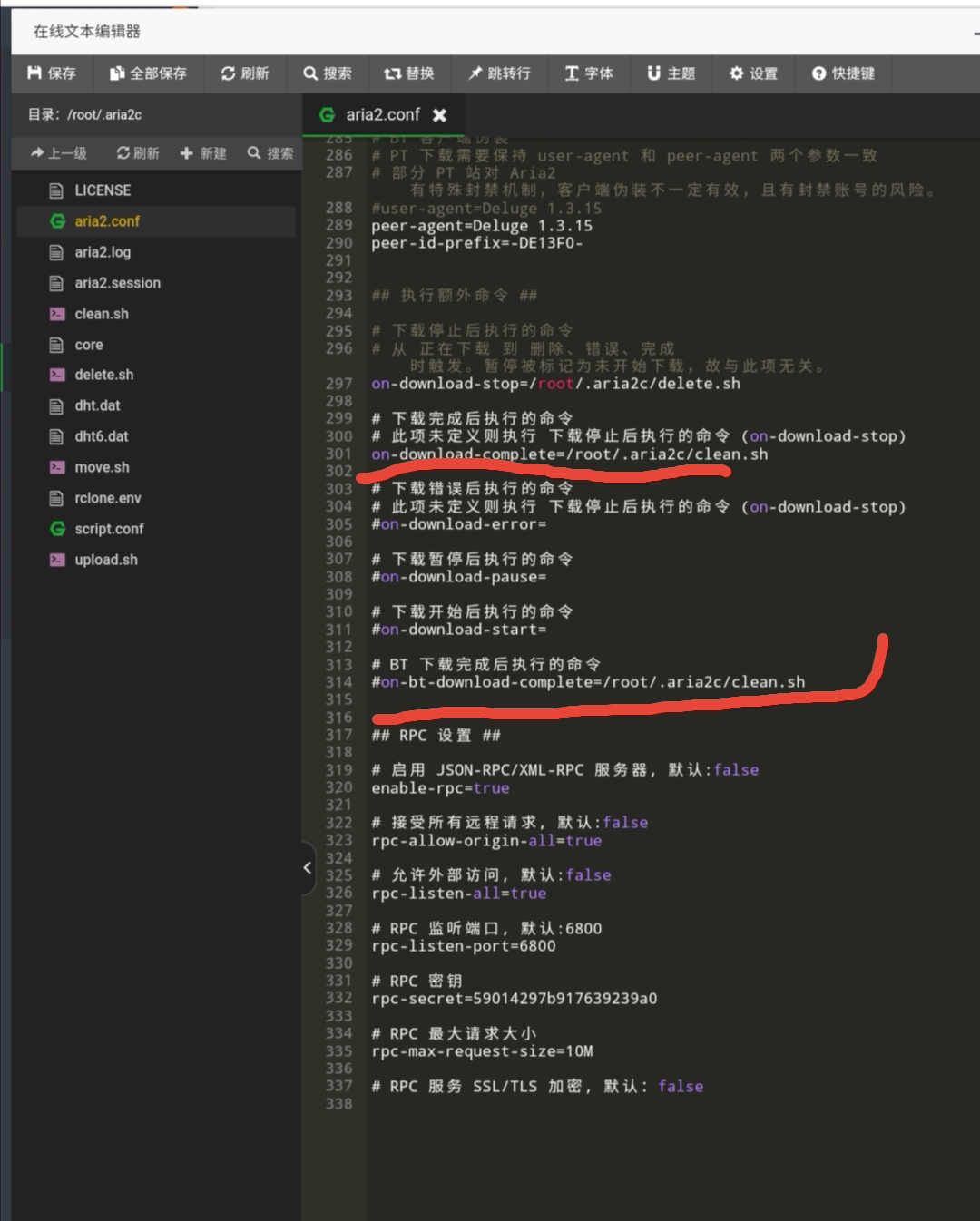
- 然后
vim /root/.aria2c/script.conf将drive-name=xxx改成rclone挂载的网盘名字如dsm。同时去掉注释,更改上传到的路径如/rc,以及日志如果有需要!如图: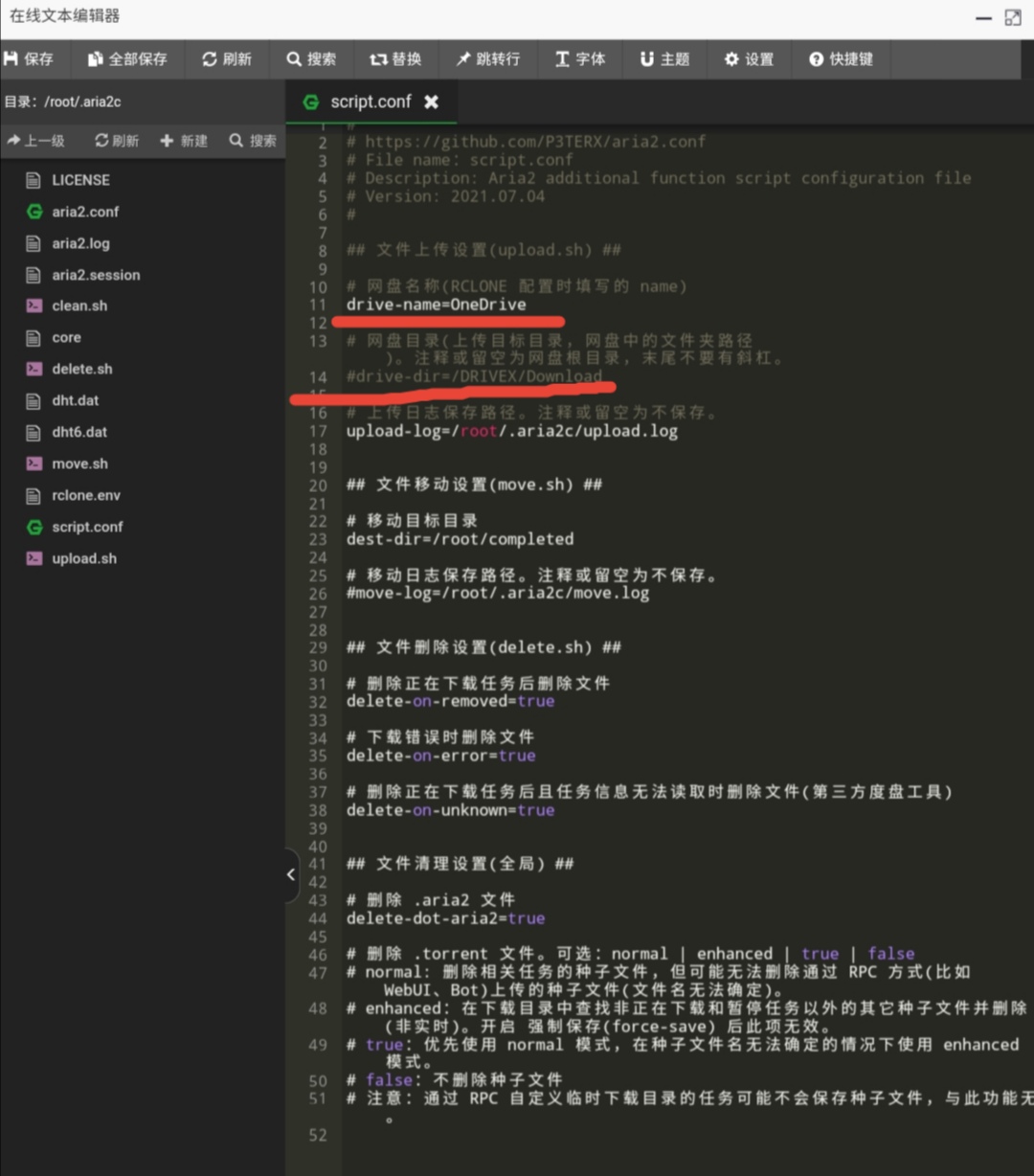
然后通过ssh输入./aria2.sh重启aria2使之生效!
实测rclone搭配aria2里开启自动上传脚本upload.sh后会和cloudreve里的离线冲突导致cloudreve离线用不了!所以,同一台机器的同一个aria2只能cloudreve和rclone二选一。
要不:cloudreve+clean.sh其他不用管!
要不rclone+upload.sh:更改scrip.conf里盘符和位置。